Import
MBOX import
Bring any standard .mbox archive into Mailbox Client — from Google Takeout, Thunderbird, Apple Mail or any client that exports the format.
- Import one or several
.mbox files in a single pass.
- MIME parsing covers
multipart/alternative, multipart/related, multipart/mixed and most charset combinations (UTF-8, ISO-8859-*, Windows-125*, etc.).
- Quoted-printable and Base64 transfer encodings decoded automatically.
- Encoded headers (RFC 2047) — including Q and B variants — fully supported.
- Gmail labels (
X-Gmail-Labels) preserved as filterable tags.
- Step-by-step progress UI: prepare, copy, parse, save, reindex, Spotlight.
- Set
MBOX_CHARSET_DEBUG=1 in the scheme to diagnose tricky encodings.
Organization
Libraries
Every imported file becomes a named library: think of them as separate inboxes you can browse or filter independently.
- Rename a library at any time from the Manage Libraries panel.
- Delete a library to remove both the archive on disk and every parsed message.
- Automatic discovery of libraries already present on disk and in iCloud Drive.
- Sidebar filter shows message counts per library.
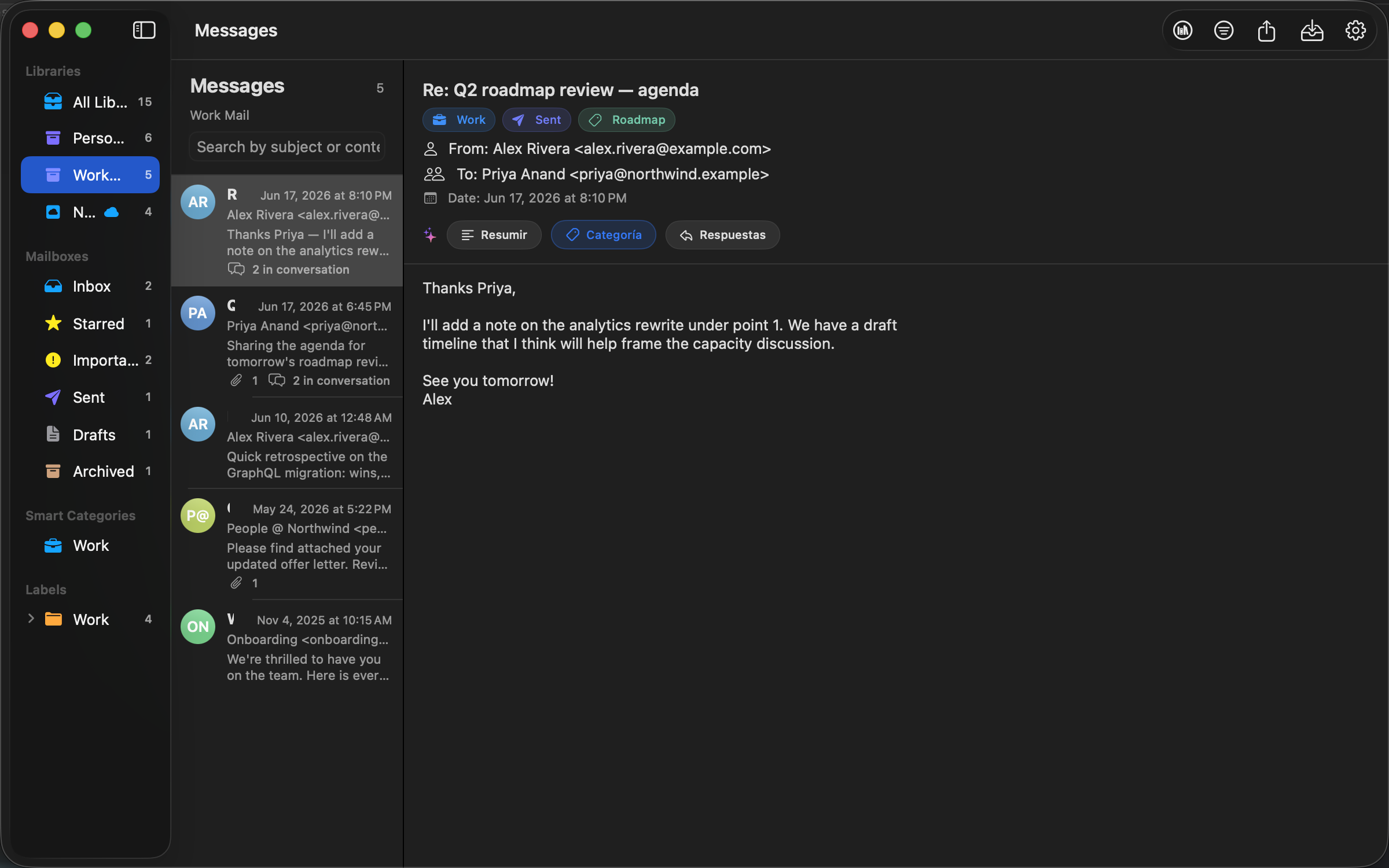 The Work library selected, with Gmail labels listed as filters in the sidebar.
Search
The Work library selected, with Gmail labels listed as filters in the sidebar.
Search
Full-text search
Search across every message you've ever imported. Subject, sender, recipients, body, labels and attachment names are all indexed.
- Tokenized inverted index built locally — no external service involved.
- Filter results by library and by detected Gmail label simultaneously.
- Incremental updates: only new messages are tokenized on each import.
- Search is case- and diacritic-insensitive.
Search
Advanced search
When the search field is not enough, open the advanced filters panel for fine-grained control.
- Restrict by sender or recipient address.
- Limit to a date range (from / to).
- Only messages with attachments.
- Combine with the library / label sidebar filters.
- Active filters appear as a clear-able pill in the toolbar.
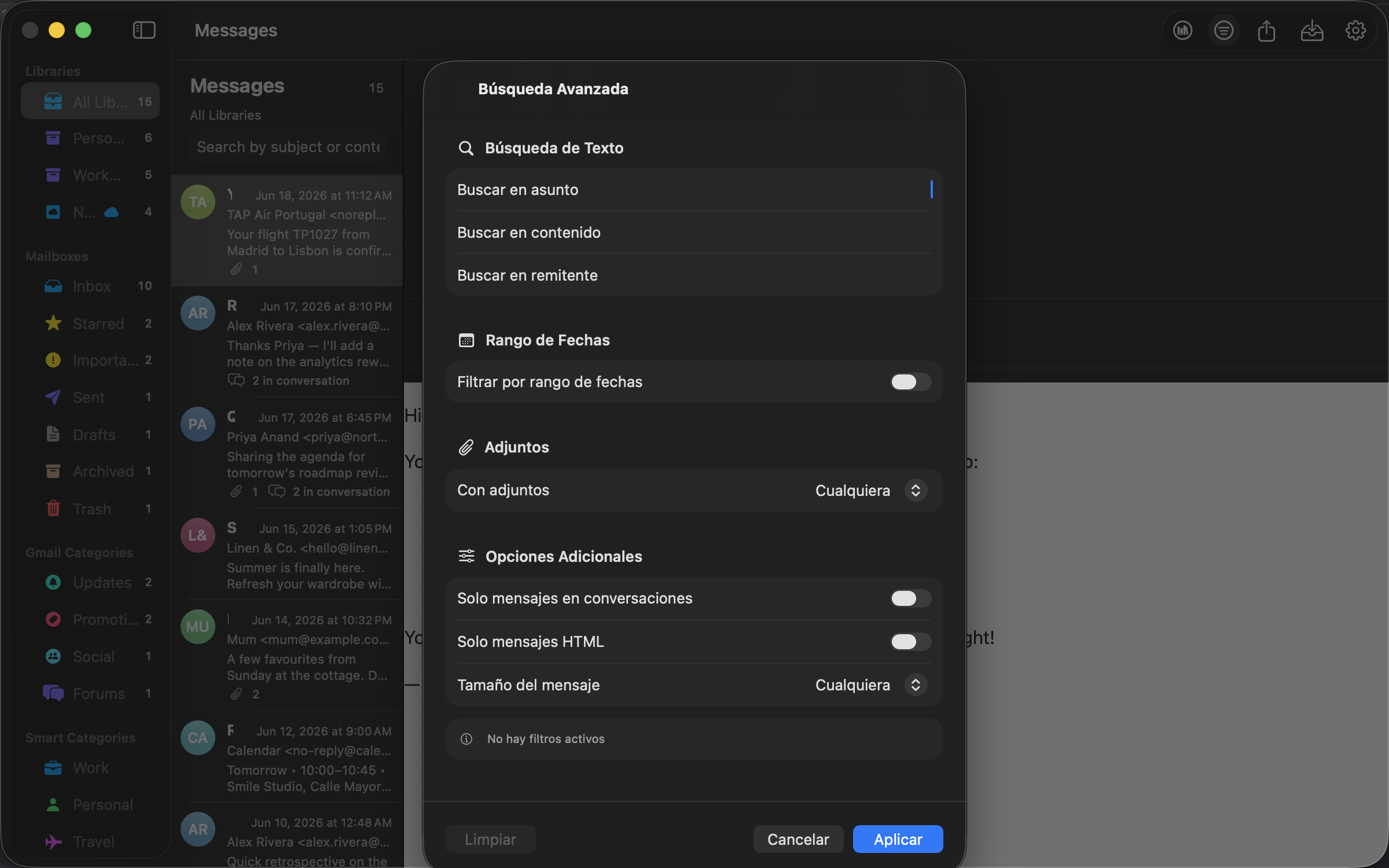 The advanced search panel layered over the message list.
Reading
The advanced search panel layered over the message list.
Reading
Reading messages
Pick the rendering that suits each message — without the privacy tradeoffs of a webmail client.
- Switch between Text and HTML on every message.
- HTML render uses
WKWebView, sandboxed by macOS.
- Inline images embedded via
cid: resolved from the message's own attachments.
- Stay in Text view if you want zero outbound network requests, ever.
- Gravatar avatars are shown for senders, with privacy-aware fallbacks.
Conversations
Conversation threading
Mailbox Client reconstructs conversations from raw MIME headers — no Gmail-specific magic required.
- Primary heuristic:
Message-ID, In-Reply-To and References chains.
- Fallback heuristic: normalized subject (strip
Re:, Fwd:, locale prefixes).
- Conversation count badge shown next to each message in the list.
- Works across libraries — a reply imported later joins the original thread.
Attachments
Attachments
Every attachment from every imported message is available right next to the body.
- List of attachments with file name, size and MIME type.
- Save individual attachments to disk via the standard macOS save panel.
- Inline images automatically resolved when reading in HTML.
- Attachment names indexed by search.
AI
Apple Intelligence
On Apple silicon Macs running macOS 15.4 or newer, Mailbox Client uses the Foundation Models framework to power on-device AI features.
- Smart summaries — condense long emails into a couple of sentences.
- Sentiment analysis — positive, neutral, or negative tone detection.
- Reply suggestions — three drafts (professional, casual, brief) generated locally.
- All inference is asynchronous and cancellable.
- If Apple Intelligence is unavailable in your region, the panel stays hidden.
Private by design. Inference runs entirely on device. No message content, metadata or prompts are ever sent to Apple, OpenAI, or any other server.
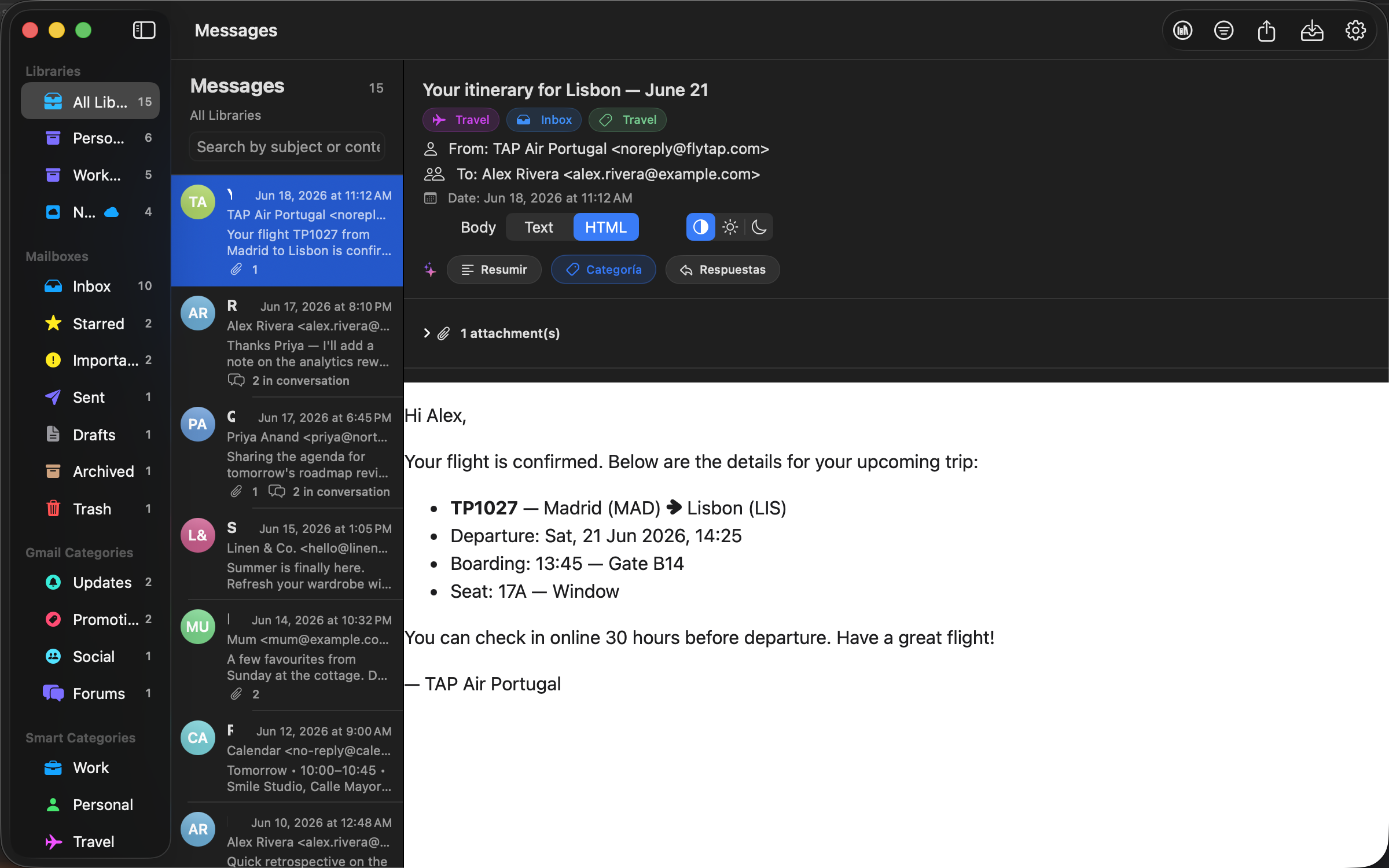 Summary, category and reply actions sit above the message body — all powered locally.
AI
Summary, category and reply actions sit above the message body — all powered locally.
AI
Automatic categorization
Mailbox Client classifies every message into one of nine categories using a combination of heuristics and on-device AI.
- Categories: Work, Personal, Finance, Shopping, Travel, Social, Newsletter, Spam, Other.
- Heuristics run instantly during import; on supported Macs the AI refines the call.
- You can manually override a category from the detail view.
- Filter the list by category to focus on a single bucket of mail.
macOS
Spotlight integration
Search your imported messages from anywhere on macOS, without opening the app.
- Optional indexing into Core Spotlight with a dedicated domain (
com.gmailimporter.messages).
- Subject, snippet, sender, recipients, full body, labels, attachment names and creation date are all indexed.
- Indexing happens in batches of 100 messages to keep the UI responsive.
- Reindex from scratch or wipe the Spotlight index from the Settings panel.
- Click any Spotlight result and Mailbox Client opens that exact message.
Sync
iCloud sync (optional)
If you use Mailbox Client on more than one Mac, opt in to keep your libraries in sync.
- Built on SwiftData + CloudKit — sync is automatic once enabled.
- Uses your private CloudKit database (
iCloud.es.cajigas.Gmail-importer), encrypted by iCloud and only readable by your Apple ID.
- Syncs libraries, messages, attachments and the search index.
- Off by default. Enable from Settings → iCloud; a restart applies the change.
- A real-time sync monitor surfaces upload / download status.
- Wipe data from iCloud while keeping the local copy whenever you want.
Heads up. Large MBOX archives can use significant iCloud storage. Check the size of your library before turning sync on.
Data portability
Export
Take your data with you whenever you want — Mailbox Client is a stop on your way, not a vault.
- Export a selection of messages or entire libraries.
- Supported formats:
.mbox, .eml and .json.
- Round-trip safe: re-importing an exported MBOX rebuilds the same structure.
- JSON export is great for scripting, archival or migration to another tool.
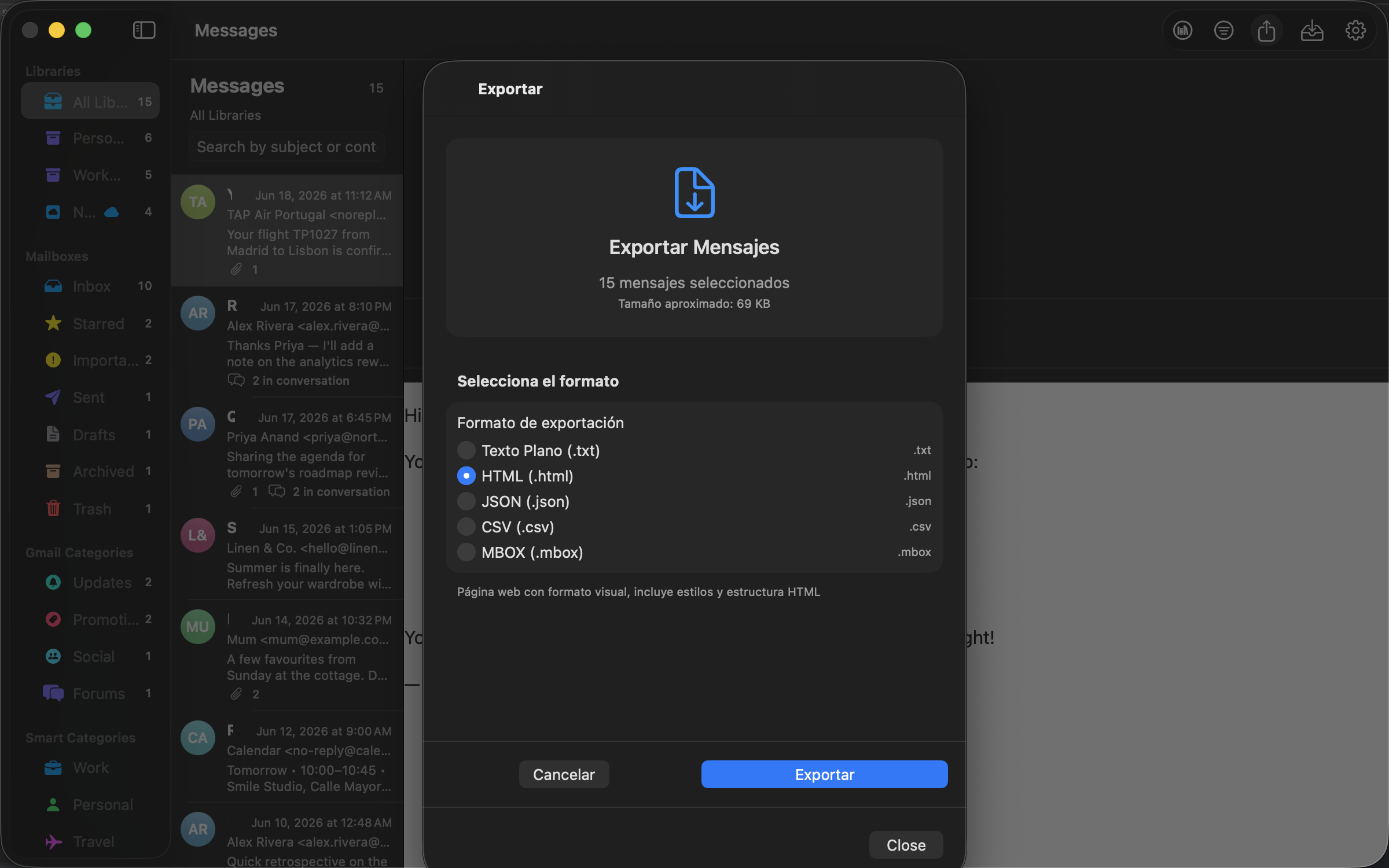 The export sheet — pick a format and Mailbox Client writes the files locally.
Insights
The export sheet — pick a format and Mailbox Client writes the files locally.
Insights
Statistics
A dashboard view summarizes your entire archive.
- Message counts by library and by Gmail label.
- Top senders by volume.
- Category distribution.
- All charts are local and update as you import.
Localization
Languages
The interface is fully localized in 11 languages and automatically follows your macOS system language.
European
English, Spanish, French, German, Italian, Portuguese (Brazil), Russian.
Asian
Japanese, Simplified Chinese, Hindi.
Right-to-left
Arabic, with full RTL layout support.
Productivity
Keyboard shortcuts
Stay on the keyboard — Mailbox Client uses standard macOS shortcuts wherever possible.
- ⌘ + F — focus the search field.
- ⌘ + I — open the importer.
- ⌘ + , — open Settings.
- ⌘ + E — export the current selection.
- ↑ / ↓ — navigate the message list.
- A full reference is available inside the app via Help → Keyboard Shortcuts.
Compatibility
System requirements
Minimum
macOS 14 Sonoma on Intel or Apple silicon.
Recommended
macOS 15.4 Sequoia or newer on Apple silicon.
Apple Intelligence
Apple silicon Mac with macOS 15.4+ and Apple Intelligence enabled in your region.
iCloud sync
A signed-in Apple ID with available iCloud storage.
Disk
Approximately the size of your MBOX archive, plus 20% for the index.
Build from source
Xcode 16 or later.
 Mailbox Client